Move from the Kanban plugin to Obsidian Bases
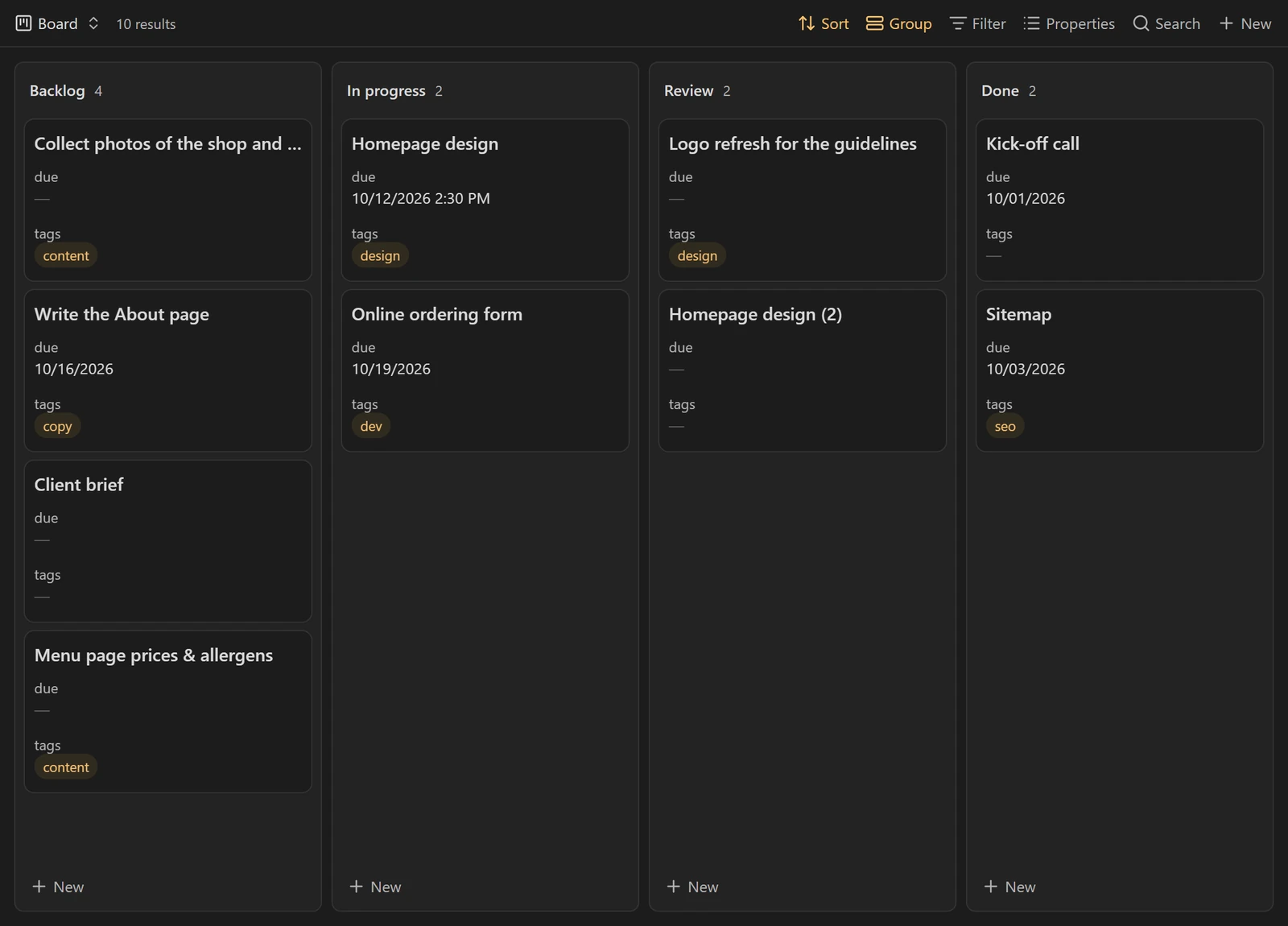
Since Obsidian 1.14, Bases has a native Kanban view. To switch, each card from the Kanban plugin becomes a note with a status, which our free plugin Kanban to Bases does automatically without touching the original board.
Why switch now
The Kanban community plugin has not had a new release since May 2024, and its project page says it is looking for new maintainers. It still works. There is no guarantee, though, that a bug brought by a future ObsidianA free note-taking app for Windows, Mac, Linux, iPhone and Android. Your notes stay as Markdown files on your own computer. Brievora is a vault, a folder of notes and views that you open in Obsidian.obsidian.md version will get fixed.
Obsidian 1.14, released on 5 October 2026, shows Kanban boards without any community plugin. The Kanban view is part of Bases and is built from the properties of your notes.
In BasesThe database feature built into Obsidian: tables, cards and Kanban boards made from the properties of your notes. No plugin to install.help.obsidian.md, each card becomes a note. On the board for a bakery website redesign, the “Homepage mockup” card can then hold the brief, links to the client’s feedback and the attached files. The same note shows up in the table of all your tasks, in the project note, and in an “Overdue” view that covers all your boards at once.
If your board is a small personal list that does the job as it is, there is no rush. If it ever stops opening, the file is still readable and you can migrate then.
What changes between the two
The Kanban plugin keeps a whole board in a single MarkdownA plain-text format: a # makes a heading, asterisks make text bold. Any text editor opens these files, with or without Obsidian.markdownguide.org file. Columns are level 2 headings, cards are list items:
---
kanban-plugin: board
---

## To do

- [ ] Homepage mockup @{2026-10-20} #design

## In progress

- [ ] Pick the bread photos
Bases turns this around. Each card is a note, and the column is the value of a property, usually status. The first card above becomes a note called Homepage mockup.md:
---
status: To do
position: 1
due: 2026-10-20
tags:
  - design
board: Bakery redesign
---| Aspect | Kanban plugin | Bases Kanban view |
|---|---|---|
| Storage | One Markdown file for the whole board | One note per card, plus a .base file |
| Columns | ## headings in the file | Values of a property, in the order set by groupOrder |
| Card order | Free, by drag and drop | Follows the sort chosen in the view |
| Card limit per column | Yes, with (N) in the heading | No equivalent in the Obsidian documentation |
| Archive | A section at the bottom of the file | A status value or a filter, as you prefer |
| Same cards in other views | No | Yes: table, cards, a base embedded in a note |
| Plugin to install | Yes, a community plugin | No, Bases is part of Obsidian |
Migrate by hand
For a board of fifteen or so cards, the manual method takes half an hour and makes you reread every card, which doubles as a cleanup.
- Make a copy of the board file, or of the whole vault.
- For each card, create a note named after the first line of the card. Add the
statusproperty with the column name, thendueandtagsif the card had a date or tags. Paste the rest of the text into the body of the note. - Put these notes in one folder, for example
Bakery redesign/Cards. - Create a base, filter it on that folder, add a Kanban view and choose
statusunder “Group by”. - Check that every column is there, in the right order, and count the cards: the total should match the old board.
- Once everything is there, move the old board to an archive folder.
A card that only holds a link, such as [[Bakery brief]], already points to a note. Do not copy it: add status to the existing note, and it takes its place in the column.
The resulting .base file looks like this:
filters: 'file.inFolder("Bakery redesign/Cards")'
views:
  - type: kanban
    name: Board
    groupBy:
      property: status
      direction: ASC
    groupOrder:
      - To do
      - In progress
      - Done
    sort:
      - property: due
direction: ASCMigrate with Kanban to Bases
Beyond a few boards, copying by hand gets long and things slip through. The free Kanban to Bases plugin does these steps for a whole board. It needs Obsidian 1.14 or later.
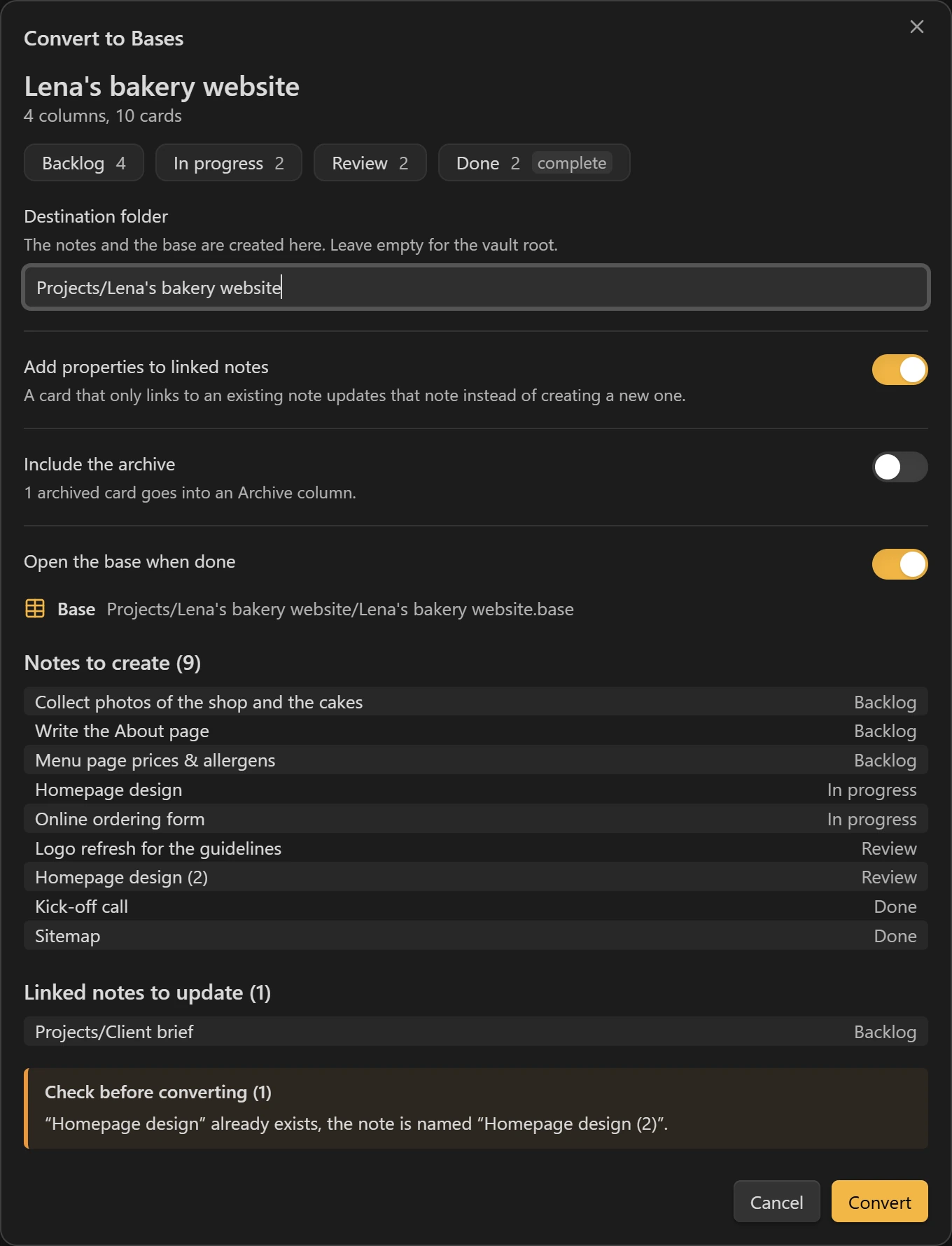
- Open the board and click “Convert to Bases” at the top right. The command palette has the same action: “Convert this Kanban board to Bases”.
- Read the preview: columns, notes to create, linked notes to update, warnings. Change the destination folder if needed. By default, it is a folder named after the board, next to it.
- Click “Convert”. The base opens in a new tab with two views: “Board”, in Kanban, and “All cards”, as a table.
What each method keeps or loses
| On the board | By hand | With Kanban to Bases |
|---|---|---|
| Columns and their order | Copy them into the view | Kept as they are, (N) limit removed from the name |
| Card order within a column | Rebuild it with a sort | position property (1, 2, 3…) |
Dates @{…} and times @@{…} | Retype them as a property | due property, read with the board’s date settings |
| Checked boxes, a column marked “Complete” | Carry them over yourself | done: true |
#tags | Copy them into tags | tags property, without the # |
key:: value fields | Copy them over | A property with the same name |
| A card that is only a link to a note | Case by case | Updates the existing note instead of creating a copy |
| The archive | Your call | Left out by default, or converted into an extra column |
The plugin also cleans up names: it removes characters a file name cannot hold and adds a suffix to duplicates, for example “Homepage mockup (2)”.
In the plugin settings, you can rename the six properties it writes (status, position, due, done, tags, board) to match the ones in your vaultIn Obsidian, a vault is a folder on your computer that Obsidian opens: your notes, their attachments and your settings. Brievora is a ready-made vault.help.obsidian.md. Cards placed above the first column, which the Kanban plugin does not show, go to an “Inbox” column. The columns of the view are 260 pixels wide by default.
Going back
Neither method changes the original board file. As long as the Kanban plugin stays installed, it opens the board as before.
With Kanban to Bases, the command “Undo last Kanban conversion” moves the created notes and base to the trash, following your “Files and links › Deleted files” setting. Linked notes get their old properties back, except the ones you edited since. Only the last conversion can be undone, even after restarting Obsidian. For a migration done by hand, delete the notes folder and the .base file.
What you change in the base after the conversion does not flow back to the old board. When the test is over, decide which of the two is the reference and keep only that one.
Your first days in Bases
- A note that gets a new
statusvalue stays hidden until its column is added to the view. - Dragging a card to another column changes its
status. Moving it within its own column does not changeposition: to reorder, edit the value. - When everything works, turn off the Kanban plugin. The old file stays readable as a plain Markdown list.
Questions
Is the Kanban to Bases plugin free?
Yes. It is free, released under the MIT license, makes no network requests and also works on mobile.
Can I convert several boards?
Yes, one board at a time. Each conversion creates its own base, and the board property keeps each board’s cards apart, even when two boards have the same name.
Does it use my Kanban plugin settings?
Yes for dates. The plugin reads each board’s own date format or, failing that, the settings the Kanban plugin saved in the vault.
Are Tasks plugin tasks converted?
Only their due date (📅 2026-10-12) becomes the due property. Other Tasks plugin markers are not converted.