Obsidian Bases: the complete tutorial (Kanban view in 1.14 included)
Bases is the Obsidian feature that shows your notes like a database: a table, cards or a Kanban board, built from their properties. It ships with the app, there is nothing to install, and your notes stay plain Markdown files.
What a base is, and what it is not
A base is a .base file that holds no data of its own. It describes a selection: which notes to show, which properties to display, in what order. The values stay in the notes. When you change a date in the table, ObsidianA free note-taking app for Windows, Mac, Linux, iPhone and Android. Your notes stay as Markdown files on your own computer. Brievora is a vault, a folder of notes and views that you open in Obsidian.obsidian.md writes it to the property of that note.
Take a website redesign for a bakery. Each task in the project is a note, and its header carries four properties:
---
type: task
project: "[[Martin Bakery website]]"
status: In progress
due: 2026-10-23
---
A base filtered on type == "task" gathers all those notes in one table, whatever folder they sit in. A second view of the same base can show them in columns, one per status.
What a base does not do
- It does not read the body of your notes. Filters work on properties and on file information (name, folder, dates, links, tags). A checkbox written halfway down a note does not show up in the base.
- It does not join tables the way Notion or Airtable do. A task points to its project through a property that holds a link to the project note.
- It keeps no edit history and no per-person permissions. The vault is still a folder of files, backed up with whatever tools you choose.
Create your first base in five minutes
Start from a vaultIn Obsidian, a vault is a folder on your computer that Obsidian opens: your notes, their attachments and your settings. Brievora is a ready-made vault.help.obsidian.md that already has a few task notes like the one above.
- Open the command palette (Ctrl+P, or Cmd+P on a Mac) and run “Bases: Create new base”. You can also right-click a folder in the file explorer and choose “New base”.
- Rename the file, for example
Tasks.base. With no filter, the base lists every file in the vault. - Click “Filter”, then “Add filter”, and set the condition
typeistask. Only the tasks remain. - Click “Properties” and tick
project,statusanddue. Each one becomes a column. - Click “Sort” and pick
due, ascending. The most urgent task moves to the top.
Behind the interface, the file now contains this YAML. You can also write it by hand in a text editor:
filters:
  and:
    - 'type == "task"'
views:
  - type: table
    name: View
    order:
      - file.name
      - project
      - status
      - due
    sort:
      - property: due
direction: ASCFilters, sorting and grouping
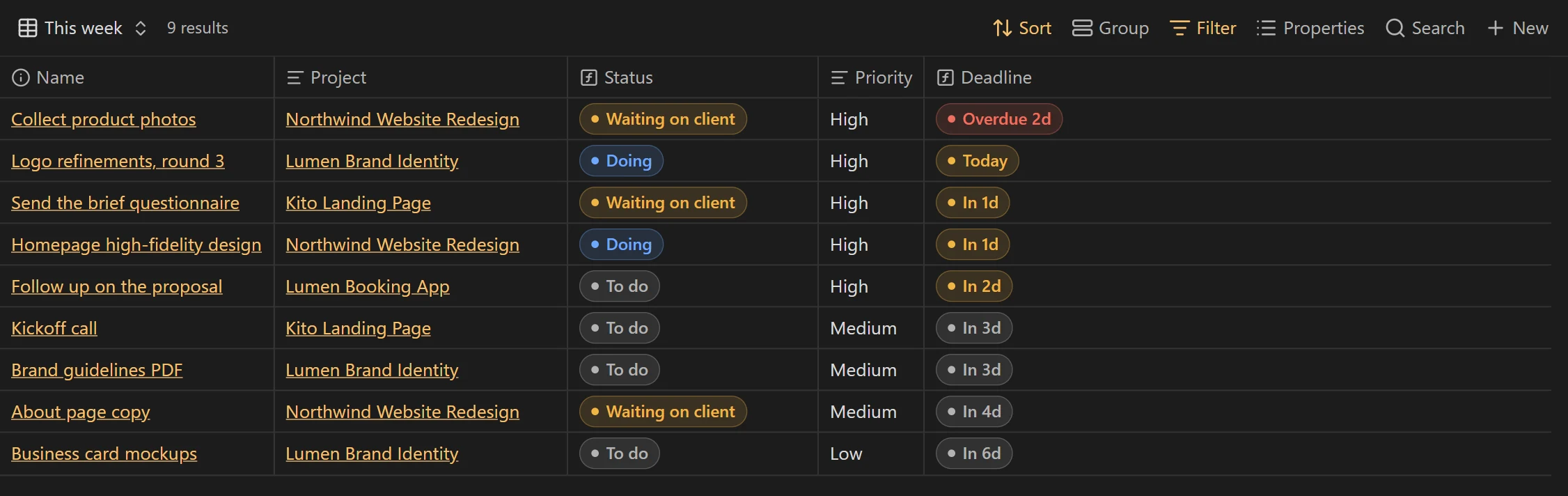
A base has two levels of filters. Global filters apply to every view: that is where you say “tasks only”. View filters are added on top. A “This week” view, for example, keeps the unfinished tasks due in the next seven days.
filters:
  and:
    - 'type == "task"'
    - '!file.inFolder("Templates")'
views:
  - type: table
    name: This week
    filters:
      and:
        - 'status != "Done"'
        - 'due'
        - 'date(due) <= today() + "7d"'
In the interface, and reads “All the following are true”, or reads “Any of the following are true” and not reads “None of the following are true”. The bare condition due drops the notes that have no due date.
A view takes several sorts but only one grouping. Group the tasks by project and each project becomes a block with its own heading. Since version 1.14, the group menu lets you reorder and hide groups, and groups collapse in the table, cards and list layouts.
Three common mistakes
- The same value spelled two ways (“In progress” and “in progress”) gives two groups. Pick your values once and stick to them.
- A due date typed as free text (“Oct 23”) cannot be compared with
today(). Give the property the Date type: in a note, click the icon to the left of its name. - Your note templates carry the same properties as your tasks, so they end up in the base. The filter
!file.inFolder("Templates")keeps them out.
Formulas: dates, durations, conditions
A formula computes a column from other properties. To add one, click “Properties”, then “Add formula”, give it a name and type the expression. A green check mark appears when the syntax is valid. You can read a formula column, but you cannot edit it in the table.
formulas:
  days_left: 'if(due, (date(due) - today()).days.round(0), "")'
  late: 'if(due, date(due) < today() && status != "Done", false)'
  deadline: 'if(due, if(formula.days_left < 0, "Overdue", "In " + formula.days_left.toString() + " d"), "")'
Subtracting two dates gives a duration, not a number. You get the days with .days, then round with .round(0). Without the rounding, a due date after the end of daylight saving time in Europe, on 25 October 2026, can show 25.04 days instead of 25, because the extra hour that night counts in the result.
To shift a date, add a duration in quotes: today() + "7d" for a week from now, now() - "14d" for two weeks ago.
The functions you will use most
| Function | What it does | Example |
|---|---|---|
today() | Today’s date, at midnight | date(due) < today() |
now() | The current date and time | file.mtime > now() - "14d" |
date() | Turns text into a date | date("2026-10-23") |
if() | One value if the condition is true, another if not | if(due, "Scheduled", "No date") |
.days and .round(0) | A duration in whole days | (date(due) - today()).days.round(0) |
.format() | Shows a date in the format you want | date(due).format("MMM D, YYYY") |
.relative() | A date in plain words (“3 days ago”) | file.mtime.relative() |
.contains() | Looks for a value in a list | tags.contains("urgent") |
file.hasTag() | The file has this tag, nested tags included | file.hasTag("client") |
file.inFolder() | The file is in this folder or a subfolder | file.inFolder("Projects") |
file.hasLink() | The note links to this file | file.hasLink("Martin Bakery website") |
.toString() | Turns a number into text so you can join it to words | formula.days_left.toString() + " d" |
Views: table, cards, list, Kanban
A base can hold several views of the same notes. Click the view name at the top left, then “Add view”. Each view has its own filters, columns, sorts and layout.
| Layout | What it shows | Since |
|---|---|---|
| Table | One row per note, one column per property, and summaries at the bottom of a column (sum, average, number of checked boxes) | 1.9 |
| Cards | One card per note, with an image on top if you pick an image property | 1.9 |
| List | A bulleted or numbered list | 1.10 |
| Kanban | Columns, one for each value of the grouping property | 1.14 |
| Map | Pins on a map, from coordinates (needs the Maps plugin) | 1.10 |
The Kanban view
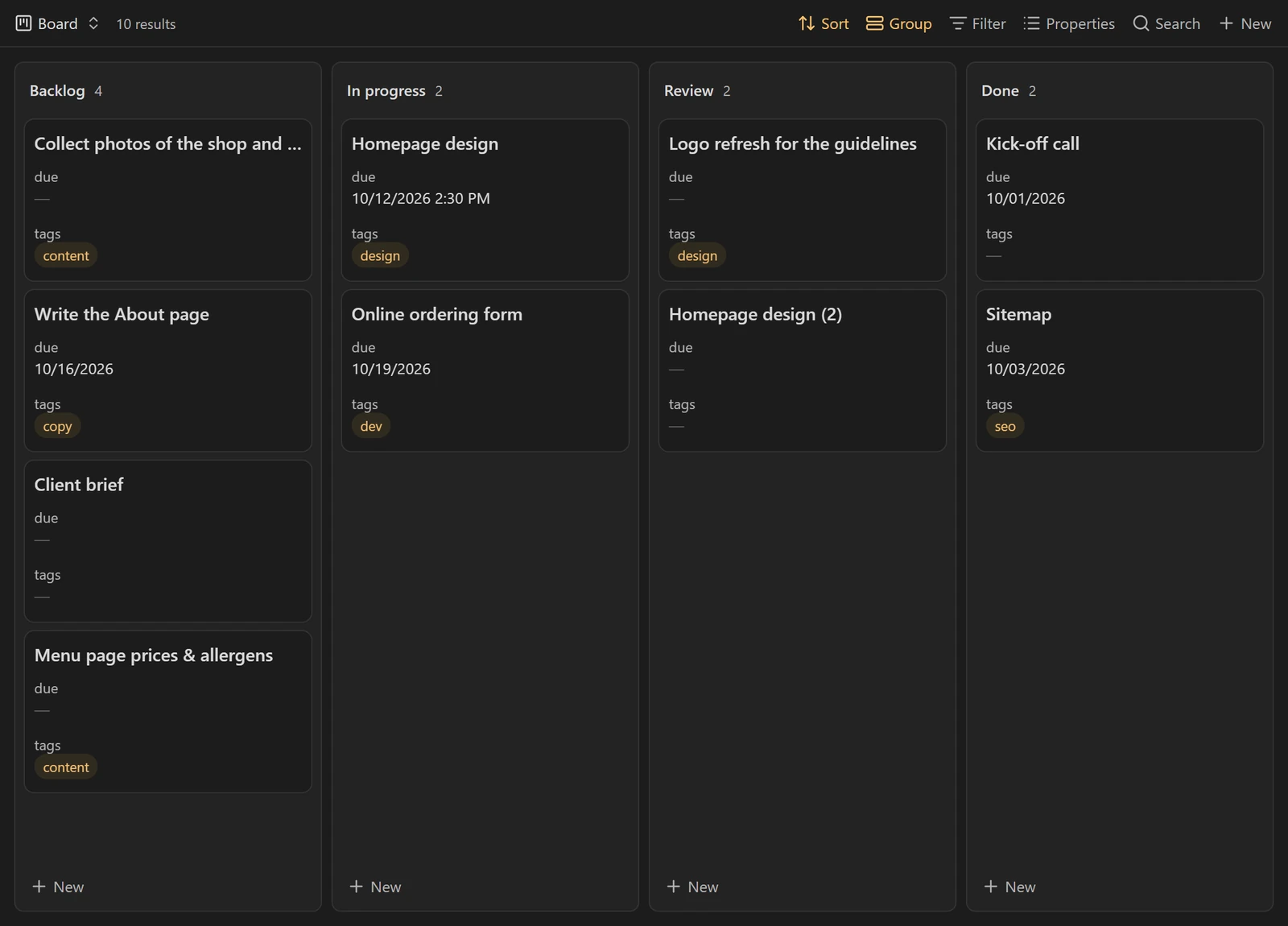
The Kanban view arrived with Obsidian 1.14, released on 5 October 2026. Each column is one value of the property chosen under “Group by”. Dragging a card from “To do” to “In progress” changes the status property in the note. Dragging a column heading changes the column order.
views:
  - type: kanban
    name: Board
    groupBy:
      property: status
      direction: ASC
    groupOrder:
      - To do
      - In progress
      - Waiting
      - Done
    columnWidth: 260
    order:
      - file.name
      - project
- duegroupOrdersets the column order. A value missing from this list gets no column, and its notes drop out of the view, so list every possible value.- Only Markdown notes can move between columns. If you group by a formula, the cards stay put.
columnWidthsets the column width in pixels. A card can also show a cover image taken from a property.
Are your boards still in the Kanban community plugin? The guide Move from the Kanban plugin to Bases explains how to bring them over without losing anything.
Embed a base in a note
A base can also sit in the middle of a note. Write ![[Tasks.base]], or ![[Tasks.base#This week]] to open a specific view. The command “BasesThe database feature built into Obsidian: tables, cards and Kanban boards made from the properties of your notes. No plugin to install.help.obsidian.md: Insert new base” creates a base and embeds it in the open note in one go.
You can also write the base inside the note itself, in a base code block. It then exists only in that note.
The this keyword makes a base reusable. In an embedded base, this means the note that holds it. Put this block in the bakery project note and it shows only that project’s tasks. Copy it into another project note and it shows the other project’s tasks.
```base
filters:
  and:
    - 'type == "task"'
    - 'project == this'
views:
  - type: table
    name: Project tasks
    order:
      - file.name
      - status
      - due
```This is how you can manage client projects in Obsidian: one note per project, and in each one, the views that concern it.
Three bases to copy
Create an empty file whose name ends in .base, paste the content, then open it in Obsidian. Rename the properties if yours are called something else. Under properties, keep the note. prefix before the name: without it, Obsidian ignores the display name.
Task tracker
filters:
  and:
    - 'type == "task"'
    - '!file.inFolder("Templates")'
formulas:
  days_left: 'if(due, (date(due) - today()).days.round(0), "")'
  late: 'if(due, date(due) < today() && status != "Done", false)'
properties:
  note.status:
    displayName: Status
  note.due:
    displayName: Due
  formula.days_left:
    displayName: Days left
views:
  - type: table
    name: Open
    filters: 'status != "Done"'
    order:
      - file.name
      - project
      - status
      - due
      - formula.days_left
    sort:
      - property: due
        direction: ASC
  - type: kanban
    name: Board
    groupBy:
      property: status
      direction: ASC
    groupOrder:
      - To do
      - In progress
      - Waiting
      - Done
    order:
      - file.name
      - project
      - due
  - type: table
    name: Overdue
    filters: 'formula.late'
    order:
      - file.name
      - project
      - due
Reading list
filters: 'type == "reading"'
properties:
  note.author:
    displayName: Author
  note.status:
    displayName: Status
views:
  - type: cards
    name: Shelf
    image: note.cover
    filters: 'status != "Dropped"'
    order:
      - file.name
      - author
      - status
  - type: table
    name: To read
    filters: 'status == "To read"'
    order:
      - file.name
      - author
      - file.ctime
Clients to follow up
filters: 'type == "client"'
formulas:
  silence: 'if(last_contact, (today() - date(last_contact)).days.round(0), "")'
properties:
  note.last_contact:
    displayName: Last contact
  formula.silence:
    displayName: Days without contact
views:
  - type: table
    name: All clients
    groupBy:
      property: status
      direction: ASC
    order:
      - file.name
      - city
      - last_contact
      - formula.silence
  - type: table
    name: Follow up
    filters: 'formula.silence > 30'
    order:
      - file.name
      - last_contact
      - formula.silence
    sort:
      - property: formula.silence
        direction: DESC
Questions
Does Bases work on a phone?
Yes, Bases is part of Obsidian on iOS and Android. To see the same notes on every device, you need to sync the vault, with Obsidian Sync or another service.
How is Bases different from the Dataview plugin?
Dataview is a community plugin with its own query language. It also reads the text of your notes, but its results are read-only. Bases is built into Obsidian, is set up with the mouse and lets you edit properties right in the table.
Can I export a base to a spreadsheet?
Yes. The results menu at the top of the view can copy the view to the clipboard or export it as CSV.
Does a base also show PDFs and images?
Yes, with no filter a base lists every file in the vault, attachments included. The filter file.ext == "md" keeps only notes.