Lite
To try the method on your current projects.
Freewith email sign-up
- Clients, projects and tasks
- Home dashboard and context panel
- English and French editions
For Obsidian client work
Brievora is a ready-made Obsidian vault for freelance designers, developers and small studios. Templates and dashboards for clients, scope, tasks, feedback rounds and invoices are built and linked. Open it and add your first client.
One-time payment. Early-bird price for the first 100 buyers, then $49.
Inside Obsidian
Home with this week’s tasks, a client, then a project with its brief, scope, feedback and invoices. The side panel lists every linked note.
What you get
Brievora counts out-of-scope requests, extra revision rounds and late invoices, and shows them on Home while there's still time to bill or chase them.
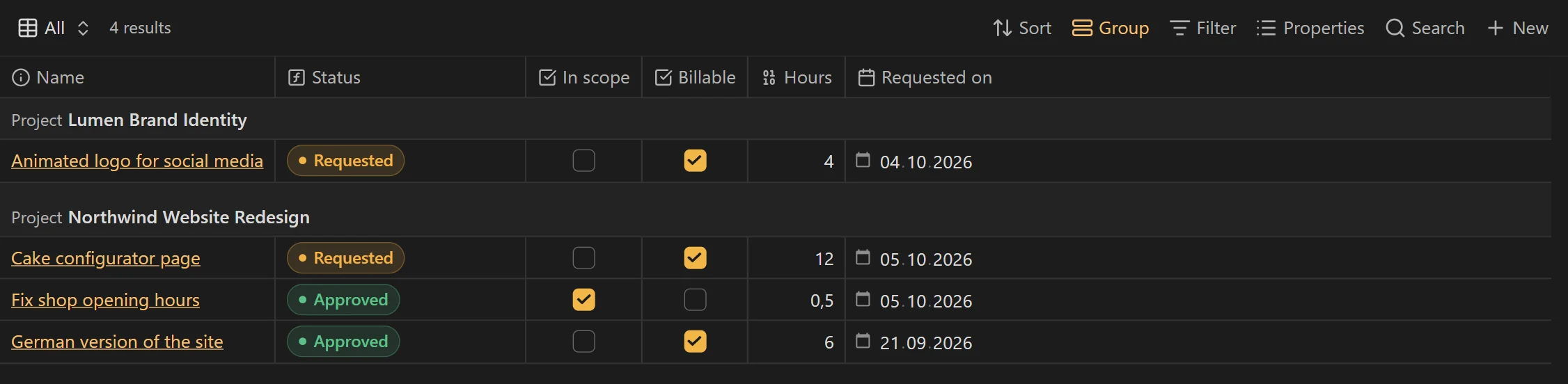
Every request outside the agreed scope becomes a change request with an estimate. The project adds up the billable hours for your next invoice.
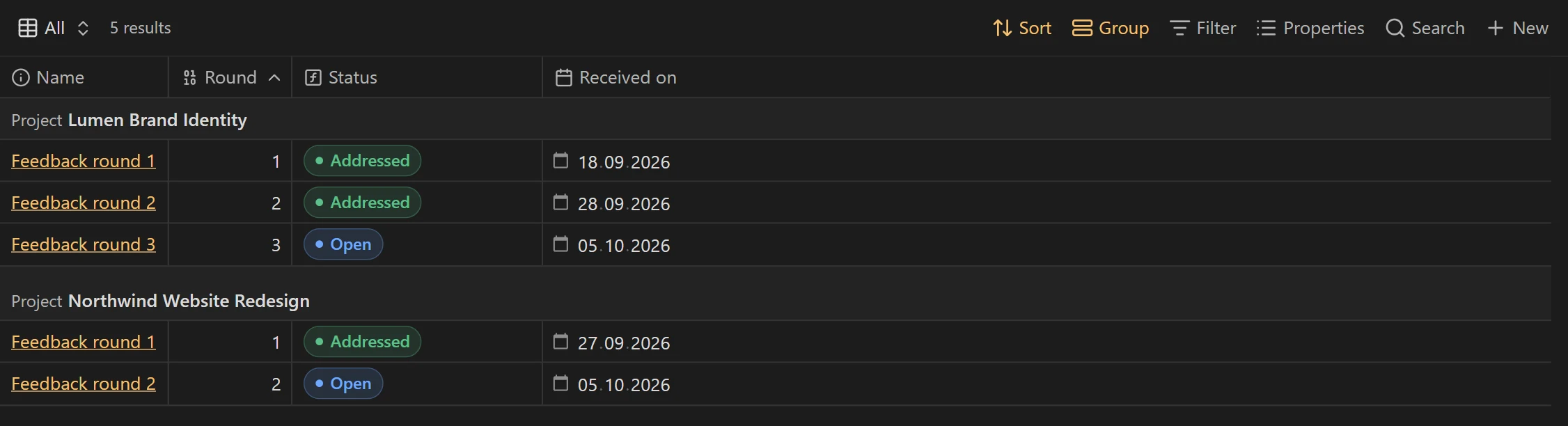
Each project knows how many rounds you agreed. You see the moment a client goes past them, before you start the extra work.
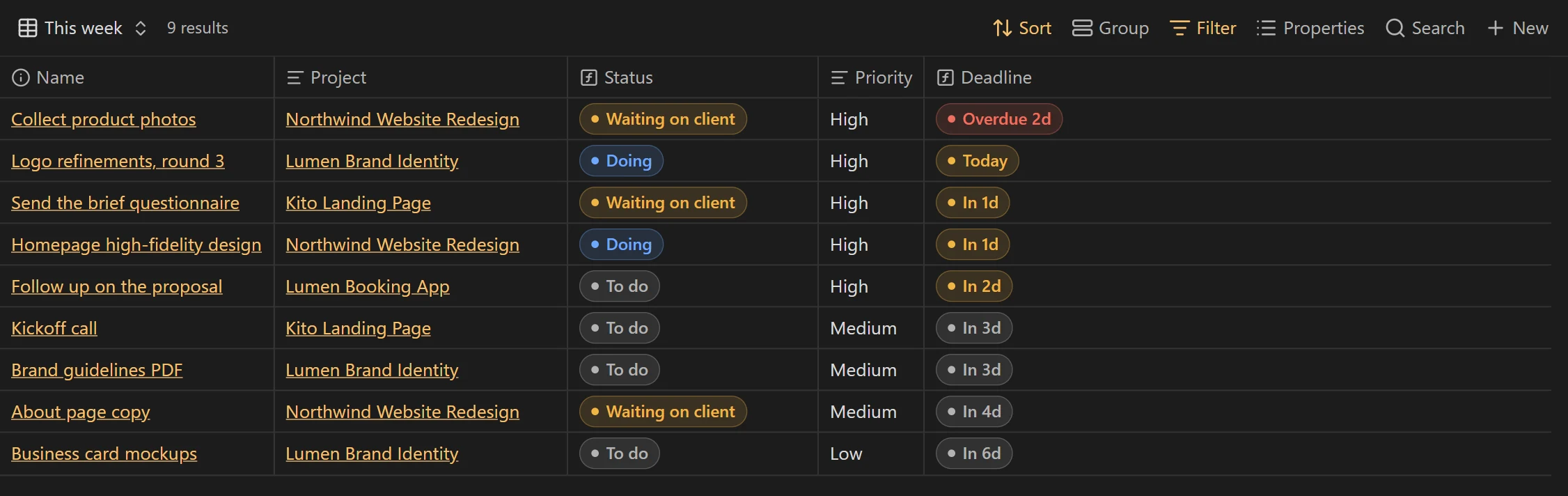
Home lists what's due and what's late, plus everything stuck until a client sends photos, copy or a sign-off.
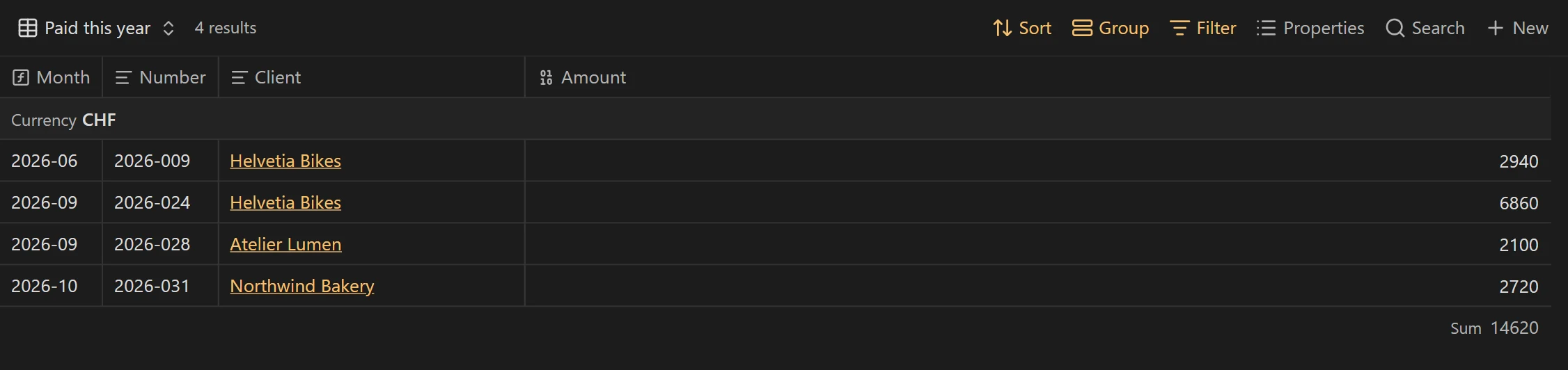
Unpaid invoices stay listed until you mark them paid, and revenue is totalled per month and per currency.
Clients, projects and invoices are Markdown files on your disk. There's no account to create and nothing to pay each month.
Templates, dashboards and links are already built. A “Start here” note walks you through your first client and project.
How it works
Each station has its own notes and dashboards, and Obsidian updates them as you work.
Goals, audience, content, brand, references, budget, timeline and who signs off. Email the questions or export them as a PDF, paste the answers back, and the brief stays attached to the project.

Each extra request becomes a change request with an estimate in hours and a billable switch. The project shows how many extra hours you can bill.
Tasks carry a project, a deadline, a priority and hours. Home lists this week, what's late, and everything blocked while you wait for the client. On the board, drag a task to the next column to change its status.
Each round of client feedback is one note: what they said, unedited, and the changes to make. The project compares rounds used with rounds included.
Deliverables keep their link, format and delivery date. Proposals show how long they've waited for an answer. Invoices are tracked until paid, with totals per month and currency.
A handoff checklist covers final files, source files, account access, a walkthrough, the last invoice, a testimonial and permission to show the work.

What's inside
Compared
Client apps send your invoices and take payments, for a monthly fee. Brievora handles the project side for a one-time price, on your own computer.
| Criterion | Brievora | Client appsHoneyBook, Dubsado, Bonsai | Notion templates | Spreadsheets |
|---|---|---|---|---|
| Price | $29 once | Monthly subscription | Template + Notion plan | Free |
| Client data stays on your computer | Yes | NoVendor servers | NoNotion's servers | Yes |
| Works offline | Yes | No | PartlyPartly | Yes |
| Brief to handoff, ready to use | Yes | Yes | PartlyDepends on the template | NoBuild it yourself |
| Counts revision rounds | Yes | PartlySome apps | No | No |
| Tracks billable scope changes | Yes | PartlySome apps | No | No |
| Sends invoices and takes payment | NoTracks invoices you send | Yes | No | No |
Built for Obsidian 1.14
Obsidian keeps your notes as files on your computer and runs on Windows, macOS, Linux, iOS and Android. Brievora needs version 1.14 or later, released in October 2026, for its Kanban boards. Obsidian is free, including for client work.
Brievora is an independent product, not made by the Obsidian team.
Pricing
Early-bird prices apply to the first 100 buyers.
To try the method on your current projects.
Freewith email sign-up
Early bird
For one person, on all their devices.
$29 $49once
For a studio of up to 10 people.
$79 $129once
One-time payment in US dollars, euros or Swiss francs. Link, Stripe’s payment service, handles payment, tax and receipts at checkout.
No. The vault opens on a “Start here” note that walks you through your first client and project in about ten minutes. Each view has a New button that creates the right kind of note, and its fields appear as a form.
Obsidian 1.14 or later, the version that added Kanban boards. Obsidian is free, including for work.
No. Brievora uses only features built into Obsidian: Bases, Properties, Templates and Canvas. The Kanban boards are Bases views too, so there is nothing extra to install.
Yes. Bases is part of Obsidian on iOS and Android as well. Wide tables read more comfortably on a computer, so plan your week there and check tasks on your phone.
Every 1.x update is free. When a new version ships, you get an email, and the Get a new download link page always gives the latest version, with the email you used at checkout. Each version lists the files to replace, so your own notes stay as they are.
Brievora is a digital download delivered right after payment, so all sales are final. At checkout you agree to immediate delivery, which waives the 14-day withdrawal right that applies in the EU. If something doesn’t work for you, write to us: refunds stay possible case by case. Try Brievora Lite first if you are unsure.
Solo covers one person on all their devices. Team covers up to 10 people in the same studio. Use it for any client work. Reselling or sharing the vault itself is not allowed.
It covers what most freelancers use a CRM for: clients, proposals and their follow-ups, projects, tasks and invoices, all linked in one vault. It doesn’t send emails or take payments: you keep your usual email and invoicing tools, and Brievora tracks what happens.
In Markdown files on your disk. Brievora has no account and no server. Sync the vault with Obsidian Sync, iCloud, Git or the tool you already use.
Early-bird price for the first 100 buyers, then $49.